CrimeTracer™ Gen3 is an agency-wide crime-fighting data platform that unifies your CAD/RMS (or any other internal system) and partner data with essential public records. Linking more than a billion records from over 2,100 agencies, CrimeTracer Gen3 delivers the right information to patrol officers, analysts, investigators, and command quickly. Gen3 is a major upgrade and adds patrol-ready tools, including Patrol and Trends Dashboards, a voice-enabled natural-language search Chatbot, AI Summarization, Case Folders, and clear Entity Summaries, to turn scattered data into decisions. Through an alliance with Thomson Reuters CLEAR®, CrimeTracer Gen3 brings public records alongside law-enforcement data in one place within CJIS-compliant boundaries.
Welcome to CrimeTracer Gen3
CrimeTracer™ Gen 3 is the next evolution of investigative intelligence—unifying CAD, RMS, partner data, and public records into a single, connected platform. With access to over one billion records from more than 2,100 agencies, Gen 3 delivers faster, clearer, and more actionable insights for patrol officers, analysts, investigators, and command staff.
Built for real-world operations, Gen 3 introduces Case Folders to centralize intelligence across people, vehicles, locations, and incidents; AI-generated summaries for reports and documents; a voice-enabled, natural-language Chatbot for faster, more intuitive searching; advanced trend analytics for analysts and command staff; and a patrol-ready operational dashboard.
CrimeTracer Gen 3 turns data into decisions—at the speed of the job.
How can teams organize and connect related incidents more efficiently?
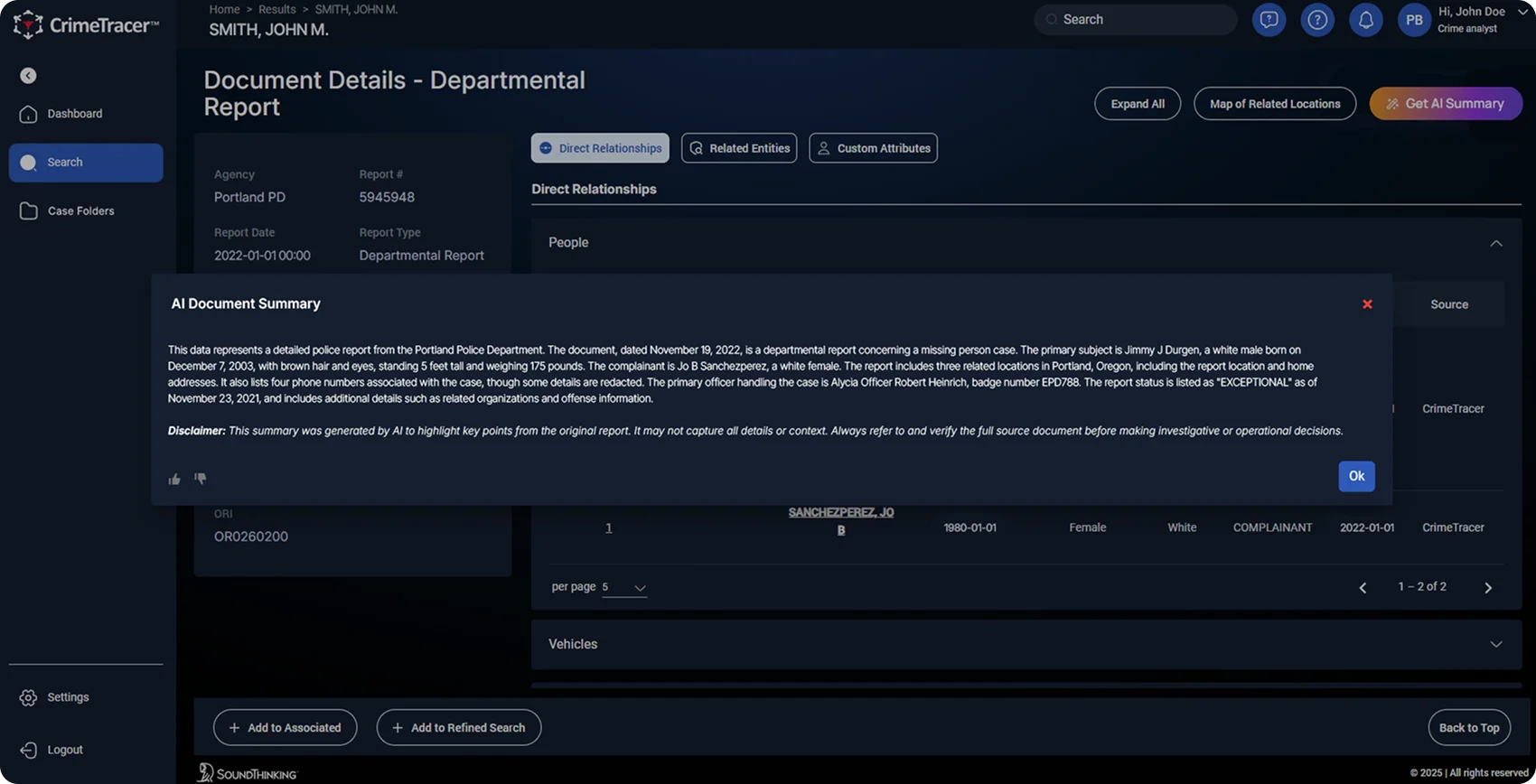
How can investigators get key facts from lengthy reports in seconds?
AI Document Summarization automatically condenses reports into short, readable overviews, surfacing the most relevant details instantly.
How do investigators keep track of people, vehicles, and places across cases?
Entity Summary Pages deliver clean, at-a-glance profiles of investigative leads, locations, vehicles, and related records—with filters and links that make it easy to navigate or add entities to a case folder.
How can officers quickly and easily search large amounts of data?
How can command staff and analysts spot emerging crime trends before they escalate?
Trends Dashboard provides a dynamic, citywide view of crime counts, trends, and hotspots. Interactive charts and filters quickly identify actionable intelligence.
How do your officers stay informed about what’s happening in their beat?
Patrol Dashboard gives each officer a beat-level view of recent crimes, relevant BOLOs, and an AI summary of activity—delivering up-to-date situational awareness in the field.
Frequently Asked Questions
CrimeTracer™ Gen 3
The Patrol Dashboard is a personalized, role-based roll call view that gives officers better situational awareness while in the field. It shows each officer what matters in their beat: recent crimes, relevant BOLOs, active leads, and a concise AI summary of overnight activity. The result is straightforward: before patrol starts their shift, every unit receives a briefing on crime spikes, patrol assignments, and local priorities.
The Trends Dashboard in CrimeTracer Gen3 is a dynamic, citywide view that visualizes crime counts, trends, and hotspots at a glance. Command Staff and Analysts can use interactive charts and quick filters (date, offense, beat, shift) to spot emerging problems and drill into underlying incidents. With one click, they can push findings to the Patrol Dashboard or a case folder, turning insights into action.
The Chatbot is a natural language search interface that lets users type or speak questions (for example, “Find a white male named John Smith with a red truck”) and get immediate, usable results. Behind the scenes, it turns plain requests into precise database queries, removing the need for complex forms. Speech-to-text features then enable hands-free use in the field. It , shows the user exactly what it’s doing, but does not change data, or send information outside the CJIS boundary, giving officers faster answers when seconds matter.
Case Folders are a single workspace for an investigation where you can group related reports, leads, people, vehicles, locations, and media—so everything tied to the case lives in one place. Users add and organize suspects and documents, share the folder with authorized teammates, and generate an AI case summary to brief command or the next shift in seconds.
AI Document Summarization automatically condenses long reports into short, readable overviews, highlighting key people, places, and events. Summaries appear alongside the source document with a reminder to verify details before acting, so users can jump straight to the paragraphs that matter. The result: faster briefings, quicker reviews, and more time spent on decisions—not paperwork.
Entity Summaries are at-a-glance profiles for people, vehicles, and locations that pull identifiers, related incidents, known associates, linked addresses, and involved vehicles into one clean view. You can filter by date or jurisdiction, jump to connected records, and with a click, add the entity to a case folder or push it into a briefing as a BOLO.
CrimeTracer Gen3 connects to your CAD, RMS, or any other system, and links with SoundThinking’s SafetySmart tools like ShotSpotter®, PlateRanger™, and CaseBuilder™. It can also display selected Thomson Reuters CLEAR® records alongside agency data under your policies. Everything runs on centrally managed devices within CJIS-compliant boundaries, with permissions controlled by your agency. In practice, alerts, hits, and reports flow directly into the Patrol Dashboard, entity pages, and case folders, reducing toggling and speeding up handoffs from call to case.
CrimeTracer Gen3 uses your agency’s data to power search, briefings, and analysis; it does not alter, sell, or share your data outside your control. All processing stays within CJIS-compliant boundaries with role-based access that your agency sets, and data is encrypted in transit and at rest. Selected CLEAR® context appears only through a separate subscription with Thomson Reuters, and as allowed by your policy, and detailed audit logs track who accessed what and when for accountability.
CrimeTracer Gen3 will be available in mid–November 2025. Training will be offered, and customers can contact their Account Representative or Customer Support to learn more.
Gen 3 is a major new release that expands CrimeTracer from an investigative tool into a comprehensive, agency-wide crime-fighting solution. The new tools help patrol, analysts, detectives, and command staff streamline workflows, save time, and surface insights faster than ever before. Key additions include Patrol and Trends Dashboards, speech-to-text Chatbot, AI Summarization, Case Folders, and Entity Summaries, and a modern user design.
CrimeTracer™ Chatbot
- Converts natural language queries (like "Show me all incidents involving a red pickup truck and a white male aged 30 to 35 with brown eyes.") into SQL queries that are executed against your agency’s CrimeTracer database.
- Makes it faster and easier to search your data without needing to navigate complex forms.
- Helps users locate incidents, entities, patterns, and context efficiently through conversational search.
- It does not modify, delete, or alter any data.
- It does not generate assumptions or conclusions about the data. All responses are based on the factual contents of your database.
- It does not send data outside the CJIS boundary or log conversations outside your secure environment.
CrimeTracer™ Gen3 is an agency-wide crime-fighting data platform that unifies your CAD/RMS (or any other internal system) and partner data with essential public records. Linking more than a billion records from over 2,100 agencies, CrimeTracer Gen3 delivers the right information to patrol officers, analysts, investigators, and command quickly. Gen3 is a major upgrade and adds patrol-ready tools, including Patrol and Trends Dashboards, a voice-enabled natural-language search Chatbot, AI Summarization, Case Folders, and clear Entity Summaries, to turn scattered data into decisions. Through an alliance with Thomson Reuters CLEAR®, CrimeTracer Gen3 brings public records alongside law-enforcement data in one place within CJIS-compliant boundaries.
The Patrol Dashboard is a personalized, role-based roll call view that gives officers better situational awareness while in the field. It shows each officer what matters in their beat: recent crimes, relevant BOLOs, active leads, and a concise AI summary of overnight activity. The result is straightforward: before patrol starts their shift, every unit receives a briefing on crime spikes, patrol assignments, and local priorities.
The Trends Dashboard in CrimeTracer Gen3 is a dynamic, citywide view that visualizes crime counts, trends, and hotspots at a glance. Command Staff and Analysts can use interactive charts and quick filters (date, offense, beat, shift) to spot emerging problems and drill into underlying incidents. With one click, they can push findings to the Patrol Dashboard or a case folder, turning insights into action.
The Chatbot is a natural language search interface that lets users type or speak questions (for example, “Find a white male named John Smith with a red truck”) and get immediate, usable results. Behind the scenes, it turns plain requests into precise database queries, removing the need for complex forms. Speech-to-text features then enable hands-free use in the field. It , shows the user exactly what it’s doing, but does not change data, or send information outside the CJIS boundary, giving officers faster answers when seconds matter.
Case Folders are a single workspace for an investigation where you can group related reports, leads, people, vehicles, locations, and media—so everything tied to the case lives in one place. Users add and organize suspects and documents, share the folder with authorized teammates, and generate an AI case summary to brief command or the next shift in seconds.
AI Document Summarization automatically condenses long reports into short, readable overviews, highlighting key people, places, and events. Summaries appear alongside the source document with a reminder to verify details before acting, so users can jump straight to the paragraphs that matter. The result: faster briefings, quicker reviews, and more time spent on decisions—not paperwork.
Entity Summaries are at-a-glance profiles for people, vehicles, and locations that pull identifiers, related incidents, known associates, linked addresses, and involved vehicles into one clean view. You can filter by date or jurisdiction, jump to connected records, and with a click, add the entity to a case folder or push it into a briefing as a BOLO.
CrimeTracer Gen3 connects to your CAD, RMS, or any other system, and links with SoundThinking’s SafetySmart tools like ShotSpotter®, PlateRanger™, and CaseBuilder™. It can also display selected Thomson Reuters CLEAR® records alongside agency data under your policies. Everything runs on centrally managed devices within CJIS-compliant boundaries, with permissions controlled by your agency. In practice, alerts, hits, and reports flow directly into the Patrol Dashboard, entity pages, and case folders, reducing toggling and speeding up handoffs from call to case.
CrimeTracer Gen3 uses your agency’s data to power search, briefings, and analysis; it does not alter, sell, or share your data outside your control. All processing stays within CJIS-compliant boundaries with role-based access that your agency sets, and data is encrypted in transit and at rest. Selected CLEAR® context appears only through a separate subscription with Thomson Reuters, and as allowed by your policy, and detailed audit logs track who accessed what and when for accountability.
CrimeTracer Gen3 will be available in mid–November 2025. Training will be offered, and customers can contact their Account Representative or Customer Support to learn more.
Gen 3 is a major new release that expands CrimeTracer from an investigative tool into a comprehensive, agency-wide crime-fighting solution. The new tools help patrol, analysts, detectives, and command staff streamline workflows, save time, and surface insights faster than ever before. Key additions include Patrol and Trends Dashboards, speech-to-text Chatbot, AI Summarization, Case Folders, and Entity Summaries, and a modern user design.
- Converts natural language queries (like "Show me all incidents involving a red pickup truck and a white male aged 30 to 35 with brown eyes.") into SQL queries that are executed against your agency’s CrimeTracer database.
- Makes it faster and easier to search your data without needing to navigate complex forms.
- Helps users locate incidents, entities, patterns, and context efficiently through conversational search.
- It does not modify, delete, or alter any data.
- It does not generate assumptions or conclusions about the data. All responses are based on the factual contents of your database.
- It does not send data outside the CJIS boundary or log conversations outside your secure environment.